
Remove TFT cluster to fit Evotech Quadlock mount?

Stevedotgone

Standard Bore
Joined
Sep 5, 2025
Messages
5
Location
Northumberland, UK
Ride
Rocket3GT Storm
Hi all, have just received my Evotech mount and Quadlock wireless charge; before I start messing on trying to fit it (I’m not mechanically minded and my go to tool is a hammer…) are there any tips or videos on how to remove the cluster so I can get to the rear of it to fit the mount?

Had a look through YouTube and this forum, but couldn’t really find anything, so any help would be appreciated!
 
Step 1: Put the hammer aside :)
It is relatively easy.

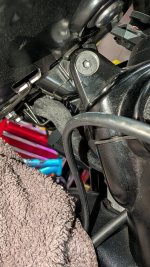
Do you have allen wrenches? You will need it. Look under the display from the left and the right side - you will see one allen head bolt on either side. You need to remove those, and then the display will lift off. The display is a little tight (by design) and may need to pull a little. Note there is a cable connecting the display to the harness, so don't yank it off :)

Be careful putting the allen bolts back - very easy to strip the threads if you cross thread them.

Note: do check to see if you need to remove the display. I got a chigee evotech mount and realized that I could have installed it without removing the display.

IMO, Evotech has among the worst instructions I've ever seen - still usable though. Here's what I used for the chigee mount - it shows how to install without removing the display
 
Last edited:
Regular or metric allens?
As I was typing my response, I knew someone would ask... :)
I'm pretty sure it was metric, but I do not remember. I will check in a bit and reply.
Here's a pic in that meantime
 

Attachments

  • PXL_20260108_232837036.jpg
    PXL_20260108_232837036.jpg
    197.9 KB · Views: 28
As I was typing my response, I knew someone would ask... :)
I'm pretty sure it was metric, but I do not remember. I will check in a bit and reply.
Here's a pic in that meantime
Thanks have seen those two Allen bolts and will get on with it from there…

The fitting instructions are shocking from the Evotech website, but the mount seems really well made 👍
 
Thanks have seen those two Allen bolts and will get on with it from there…

The fitting instructions are shocking from the Evotech website, but the mount seems really well made 👍
One note - the chigee mount came with 16mm m5 bolts - those were too short. I had to get 20mm m5 bolts instead. I reported it to evotech.

Also, once the mount was attached to the display, it was hard getting to the Allen bolts (in the picture) to reattach to the motorcycle. I had to use ball-end allen wrenches.
 
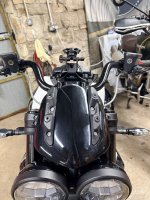
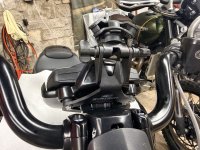
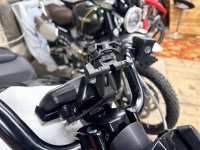
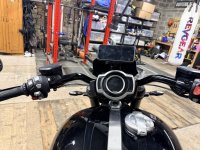
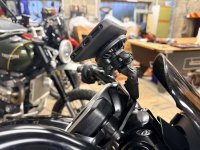
Got it fitted and only had to reach for a hammer once…

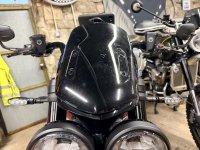
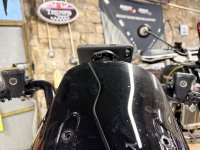
Now its on, I don’t like how high it sits the phone.. will need to investigate a slightly taller screen… maybe the power bronze in dark smoke…. Anyone have any photos?
 

Attachments

  • IMG_8149.jpeg
    IMG_8149.jpeg
    194.1 KB · Views: 41
  • IMG_8150.jpeg
    IMG_8150.jpeg
    217.1 KB · Views: 37
  • IMG_8151.jpeg
    IMG_8151.jpeg
    153.8 KB · Views: 35
  • IMG_8152.jpeg
    IMG_8152.jpeg
    184.1 KB · Views: 35
  • IMG_8153.jpeg
    IMG_8153.jpeg
    157.2 KB · Views: 37
  • IMG_8154.jpeg
    IMG_8154.jpeg
    205.6 KB · Views: 36
  • IMG_8155.jpeg
    IMG_8155.jpeg
    167.2 KB · Views: 42
****.....that does look like it sits pretty high. I went with the quadlock arms and risers and it sits just above the instrument cluster. What about the small winshield eyebrow screens you can add to the stock windshield if you dont want to get a whole new windscreen? just a thought
 
Back
Top